Blog categories and tags look deceptively similar. Both appear beside your posts, both group content, and both can create archive pages listing related articles.
But they should not do the same job.
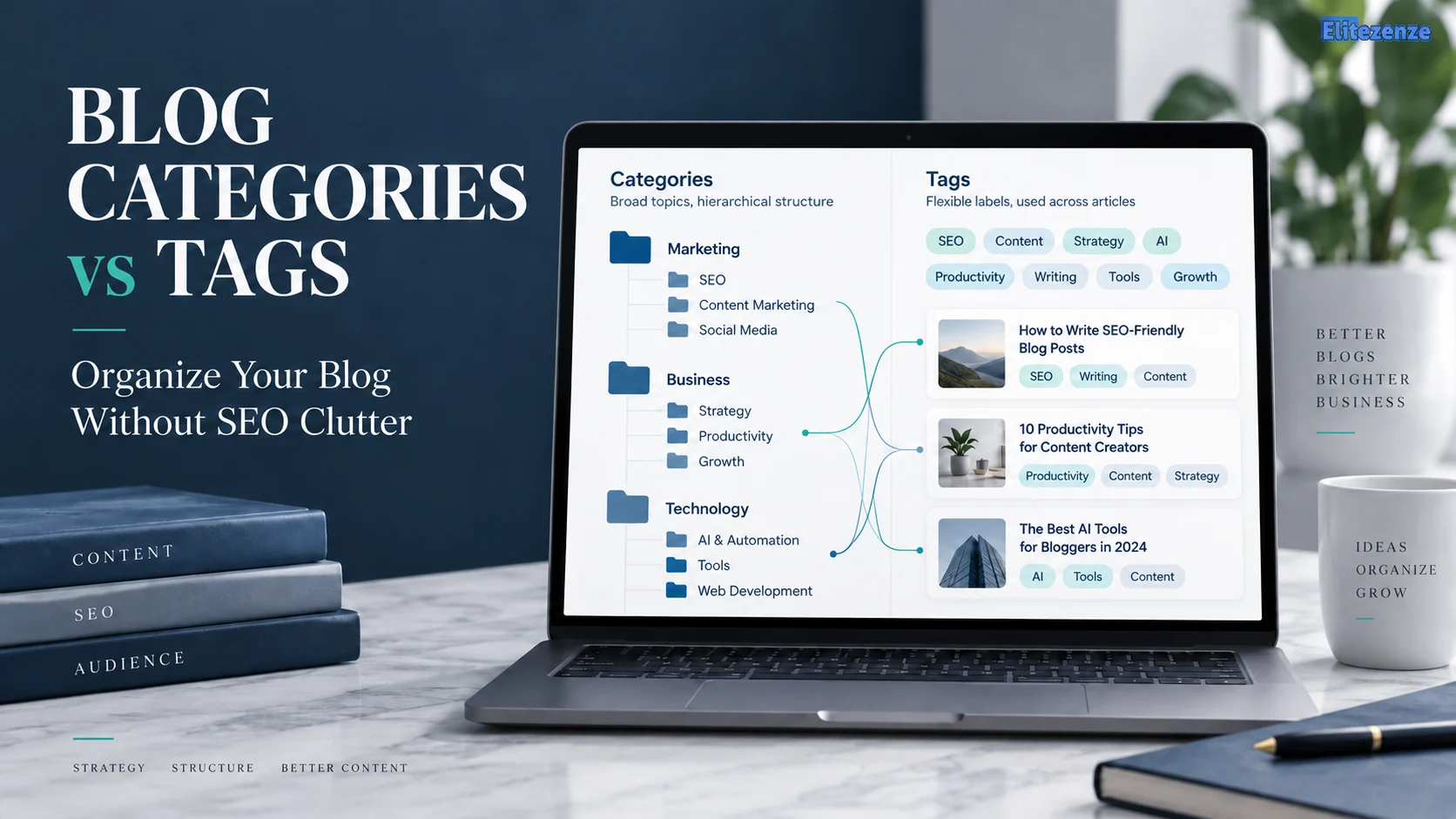
Categories organize the main subjects your blog covers. Tags are optional labels that connect posts around narrower recurring details, often across different categories. Categories can also form a hierarchy with parent and child categories, while tags remain flat.
The bigger issue is not whether you should add five tags instead of three. It is whether each category or tag makes your site easier to understand and navigate.
That distinction matters because every taxonomy term you create can become another destination on your website.
This guide will show you how to decide what deserves a category, what may deserve a tag, when you need neither, and how to avoid turning a simple blog structure into hundreds of low-value archive pages.
Blog Categories vs Tags: The Quick Answer
Think of categories as the main sections of a library and tags as labels that connect books containing a recurring subject.
Suppose you run a digital marketing blog.
Your categories might include:
- SEO
- Blogging
- Email Marketing
- Social Media
Those are substantial sections of the publication.
Inside SEO, you might create a subcategory called Technical SEO.
A tag could be something like “Google Search Console” if you regularly publish articles about Search Console across Technical SEO, Blogging and Website Traffic.
The simplest distinction is:
| Feature | Categories | Tags |
|---|---|---|
| Main job | Organize major topics | Connect narrower recurring details |
| Hierarchical | Yes | No |
| Can have parent/child structure | Yes | No |
| Needed in WordPress posts | A category is assigned | Tags are optional |
| Best use | Primary site organization | Cross-topic discovery |
| Should you create lots? | Usually no | Also no |
| SEO ranking boost | No automatic boost | No automatic boost |
WordPress itself describes categories as broader groupings and tags as more specific labels that can be used together.
WordPress: Categories vs. Tags

What Categories and Tags Actually Do
Categories create the main structure of your blog
A category should normally represent a subject that deserves a recognizable section of your website.
If somebody arrived at its archive page, would the collection make sense?
For a beginner-blogging website, categories might include:
- Starting a Blog
- Blog Writing
- SEO
- Monetization
- Website Traffic
A visitor interested in SEO can open that category and reasonably expect a useful collection of SEO content.
Categories also support hierarchy.
You could have:
SEO
→ On-Page SEO
→ Technical SEO
You do not have to build deep category trees, however. The purpose is clarity, not complexity.
If you’re still designing the wider structure of your site, Eliteze’s beginner blogging guide provides the broader workflow for choosing your focus and building your initial content system.
Blogging for Beginners in 2026
Tags connect recurring details
Tags work better for a different kind of relationship.
Imagine you publish these articles:
- How to Track Blog Traffic in Google Search Console
- How to Check Indexing Problems in Search Console
- Search Console Tips for Updating Old Content
They might live in different categories, but they share one recurring subject: Google Search Console.
A Search Console tag could therefore provide a useful cross-category collection.
Notice what makes the tag useful: multiple articles share the subject and a reader might actually want to browse them together.
Now imagine adding tags such as:
- website
- blogging tips
- marketing
- useful
- tutorial
- 2026
simply because those words appear in the article.
Those labels do not create a meaningful navigation system.
They create clutter.
Tags are not a place to store every keyword discovered during SEO research.
Categories vs Tags: The Important Differences
The easiest way to choose between them is to ask what job the term performs.
A category answers:
“Which major section of the website does this post belong in?”
A tag answers:
“What recurring attribute connects this post with useful content elsewhere?”
For example:
Category: Blogging
Subcategory: Blog Writing
Tag: Content Brief
Another example:
Category: SEO
Subcategory: Technical SEO
Tag: Google Search Console
And:
Category: Email Marketing
Tag: Automation
A good category often deserves a place in your navigation, breadcrumb trail, content plan or topic architecture.
A good tag does not need that level of prominence. It simply creates another useful path between related material.
You also do not need to force both onto every post.
A focused blog may work perfectly well with categories and contextual internal links while using few or no tags.
That is preferable to creating tags simply because WordPress provides a Tags box.
Do Categories and Tags Help SEO?
Not automatically.
There is no Google ranking bonus for creating a category called “SEO Tips,” nor does adding ten keyword-rich tags make an article more relevant.
The SEO value comes from what a well-designed structure allows you to accomplish.
Taxonomy can improve discovery and internal navigation
Google says it primarily discovers pages through links and recommends organizing a site logically so users and search engines can understand how its pages relate to each other.
A useful category archive can act as a hub linking to closely related content.
A carefully designed tag archive can do the same when it connects genuinely related material.
But adding a taxonomy term does not automatically make the archive useful.
Every taxonomy term can create an archive page
This is the part many beginners miss.
Create a category such as:
Technical SEO
and WordPress can create a URL similar to:
example.com/category/technical-seo/
Create a tag such as:
Search Console
and it can create:
example.com/tag/search-console/
That means the real question is not:
Can I add this tag?
It is:
Is this archive a destination worth creating?
If the archive contains one article and no additional purpose, it probably contributes very little.

Should category and tag archives be indexed?
Do not use one blanket answer for every website.
An archive may deserve indexation when it:
- groups a meaningful collection of related content;
- satisfies a recognizable reader need;
- has a clear title and description;
- is linked naturally from the site;
- offers a useful browsing experience;
- is sufficiently distinct from other taxonomy archives.
A low-value archive may be a candidate for consolidation, removal or noindex, depending on what the URL is doing.
Google explains that noindex prevents an accessible page from being included in its search results once Google crawls and processes the directive.
Google’s noindex documentation
Do not combine a robots.txt block with a noindex instruction and assume Google will see the noindex. Google needs to crawl the page to process it.
Do taxonomy archives cause a duplicate-content penalty?
Do not panic merely because the same post appears on its main URL and is also listed on a category or tag archive.
Google says duplicate content is generally not a violation of its spam policies. It may choose representative canonical URLs when substantially similar URLs exist.
That does not mean you should create unlimited redundant archives.
The problem is better framed as:
- unnecessary URLs;
- weak navigation;
- overlapping archives;
- wasted maintenance;
- unclear architecture;
- potentially inefficient crawling on very large sites.
For a normal small blog, however, a handful of imperfect taxonomy pages is not a catastrophe.
Focus on making the structure useful rather than chasing a theoretical “duplicate-content penalty.”
Should Something Be a Category, Subcategory, Tag—or Nothing?
Use this four-question framework.
1. Is it a major subject you expect to cover repeatedly?
Make it a category.
Example:
SEO
If you expect dozens of articles about SEO, readers should be able to browse that section directly.
2. Is it a meaningful subdivision of a major subject?
Consider a subcategory.
Example:
SEO
→ Technical SEO
The child topic is narrower but still substantial enough to support its own group of content.
3. Does it describe a recurring detail across multiple categories?
Consider a tag.
Example:
Google Search Console
Search Console might appear in SEO, Blogging and Website Traffic articles.
4. Is it relevant to only this post?
Usually create nothing.
You do not need a taxonomy term for every idea mentioned in an article.
That final option is what prevents taxonomy bloat.

A simple test works surprisingly well:
If this term creates an archive page tomorrow, would I willingly send a reader to it?
If the answer is no, reconsider creating it.
How to Build a Clean Blog Taxonomy
Start with your content pillars
Do not begin by opening WordPress and inventing categories one by one.
Start with the bigger content strategy.
What major subjects does the site intend to own?
If you are still mapping future posts, Eliteze’s blog outline and topic-planning resources can help you connect individual articles to broader reader needs before creating more taxonomy.
A site may need four categories. Another may need twelve.
There is no universal correct number.
The better question is whether each category has a distinct job.
Give each article one obvious home where possible
A post can technically belong to multiple categories, but you should not assign five simply because the article mentions five subjects.
Ask:
If a reader had to look for this article in one section, where would they expect to find it?
That is usually the best primary home.
Add tags after the structure works
Do not design your category architecture around tags.
First create clear major sections.
Then watch for recurring characteristics that readers would genuinely benefit from browsing across those sections.
Those are potential tags.
Use contextual internal links too
Taxonomy is not a replacement for contextual internal linking.
If one article naturally answers the next question raised in another article, link them directly.
Google says crawlable links help it find pages and understand relevance.
That means you do not need to create a tag simply to connect two articles.
Sometimes a normal internal link is the cleaner solution.

How to Clean Up Existing WordPress Categories and Tags
If your blog already has dozens or hundreds of tags, do not delete everything randomly.
Use a structured audit.
Step 1: Inventory the taxonomy
List:
- category name;
- tag name;
- archive URL;
- number of posts assigned;
- whether the archive receives traffic;
- whether it overlaps another term;
- whether readers can reach it naturally.
You can use WordPress plus Google Search Console to investigate what actually exists and whether taxonomy URLs are appearing in search.
Step 2: Find obvious problems
Look for:
- tags attached to one post;
- singular/plural duplicates;
- synonyms;
- a category and tag doing exactly the same job;
- spelling variants;
- abandoned categories;
- extremely broad tags;
- terms that no reader would intentionally browse.
Examples:
SEO ToolSEO Tools
You probably do not need both.
Likewise:
AI WritingAI Content Writing
may be candidates for consolidation if they represent the same reader need.
Step 3: Decide what happens to each term
Give every term one outcome:
Keep
The archive has a clear role.
Merge
Two terms perform essentially the same function.
Reclassify
A tag has grown into a major section and should become a category, or a narrow category is better handled another way.
Remove
The taxonomy offers no meaningful value.
Improve
The archive is useful but needs a clearer description, better organization or stronger internal navigation.
Step 4: Handle removed URLs deliberately
Do not redirect every deleted taxonomy archive to your homepage.
If a removed archive has a genuinely equivalent replacement, a permanent redirect to that replacement can make sense.
If there is no meaningful substitute, a proper 404 response is normal.
Google has explicitly said that 404s are a normal part of the web and may be preferable to irrelevant redirects.
Step 5: Recheck the result
After cleanup:
- test archive URLs;
- verify redirects;
- inspect important pages in Search Console;
- confirm internal links still work;
- review the XML sitemap;
- check that intended
noindexdirectives are accessible to crawlers; - make sure posts still belong to appropriate categories.
Your broader publishing workflow should also include checking categories, tags, canonical URLs and indexability before each post goes live. Eliteze’s publishing checklist covers those final checks.

Common Blog Categories and Tags Mistakes
Using tags as SEO keywords
A tag is not a focus-keyword field.
Do not add every keyword variation from your research.
Creating categories before you have enough content
“Email Copywriting for SaaS Onboarding” might be an article topic before it deserves an entire category.
Build the content first.
Creating synonymous taxonomy terms
Avoid structures such as:
- Blog SEO
- Blogging SEO
- SEO for Blogs
- Blog Search Optimization
unless each genuinely serves a different organizational purpose.
Assigning every post to several categories
When everything belongs everywhere, categories stop helping readers understand the structure.
Automatically indexing every archive
Some archives may be valuable search destinations.
Others may not.
Evaluate them individually or by clearly defined taxonomy type.
Automatically noindexing every archive
The opposite blanket rule is also weak.
A substantial category page that acts as an important hub can be valuable to users and search engines.
Frequently Asked Questions
Are blog categories or tags better for SEO?
Neither automatically improves rankings. Categories are usually more important to the site’s primary organization, while tags can support discovery when they create meaningful relationships between posts. Their SEO value comes from useful structure, internal links and worthwhile archive pages rather than the labels themselves.
How many categories should a blog have?
There is no universal number. Use as many categories as necessary to represent distinct major content areas without creating overlapping or nearly empty sections. A small focused blog may need only a few.
How many tags should I use per post?
There is no required number. Zero can be correct. Several can also be correct when each label connects the article to a useful recurring subject. Do not add tags simply to hit a target.
Can a blog post have both categories and tags?
Yes. That is a normal configuration. The category gives the article a primary organizational home, while tags can connect it with posts sharing narrower characteristics.
Can categories and tags have the same name?
WordPress can allow similar taxonomy terms, but doing so often creates two archives serving nearly the same purpose. Unless you have a clear reason for both, choose the taxonomy that best matches the term’s job.
Should WordPress tag pages be indexed?
Only when they are useful enough to deserve search visibility. A substantial, clearly defined tag archive can be indexable. A collection of one-post or redundant tag pages usually provides much less value and may be better consolidated, removed or noindexed.
Can I run a blog without tags?
Yes. Tags are optional. A focused site can rely on clear categories, navigation and contextual internal links without maintaining a large tag system.
Final Takeaway
The best way to settle blog categories vs tags is to stop asking which one is “better for SEO” and ask what each term does for the reader.
Use categories for the major structure.
Use subcategories when a major section needs a meaningful subdivision.
Use tags only for recurring relationships that genuinely improve discovery.
And when a term serves no useful navigational purpose, create nothing.
A smaller taxonomy you understand and maintain is usually more useful than hundreds of labels nobody visits.